

Step-by-step guide get rid of Instagram’s activity bubbles for good
Saloni Jha | Apr 17, 2026, 17:14 IST
Tired of Instagram’s floating activity bubbles? Here is the easy step-by-step fix for a cleaner, calmer scrolling experience.

Image credit : AI generated via ChatGPT | Removing clutter, reducing noise, and controlling who sees what turns Instagram back into something it should have stayed all along: your space.
Instagram was supposed to be a chill little scroll. Instead, many users now open the app only to be greeted by floating profile icons bouncing around posts like they pay rent there.
Yes, those activity bubbles. The tiny faces showing who liked, shared, or interacted with a post. Cute in theory, chaotic in practice.
If your feed has started to feel less zen and more visual traffic jam, there is good news. Instagram has quietly dropped a setting that lets you switch them off completely.
![The Tab | Turning it off keeps your activity private and your mysterious aura intact.]()
If you are ready to reclaim your screen space, here is how to do it:
Open Instagram
Go to Settings
Scroll down and tap Content Preferences
Turn on Hide all activity bubbles in feed and reels
Once that toggle is on, the floating heads vanish from both your main feed and Reels.
![The Tab | Yes, those activity bubbles. The tiny faces showing who liked, shared, or interacted with a post. Cute in theory, chaotic in practice.]()
Peace is restored.
If you are not ready for commitment, maybe you are not ready for a full break-up with the bubbles. Fair enough.
Instagram also has temporary fixes for people who want silence only sometimes. You can swipe down on the bubbles to hide them in the moment. You can also pinch outward on your screen to remove overlays while browsing.
It is giving casual boundaries.
Many users do not realise Instagram may show mutual followers the posts you have liked or interacted with. Yes, your digital business can become public gossip faster than expected.
If that feels deeply unnecessary, try this:
Go to settings and activity
Scroll to activity in friends tab
Choose whether likes and comments on Reels are visible to mutual followers
Turning it off keeps your activity private and your mysterious aura intact.
![The Tab | Choose whether likes and comments on Reels are visible to mutual followers.]()
Tiny interface changes can make a huge difference. Removing clutter, reducing noise, and controlling who sees what turns Instagram back into something it should have stayed all along: your space.
Because sometimes self-care is not a face mask or journalling.
Sometimes it is deleting floating heads from your feed.
Yes, those activity bubbles. The tiny faces showing who liked, shared, or interacted with a post. Cute in theory, chaotic in practice.
If your feed has started to feel less zen and more visual traffic jam, there is good news. Instagram has quietly dropped a setting that lets you switch them off completely.
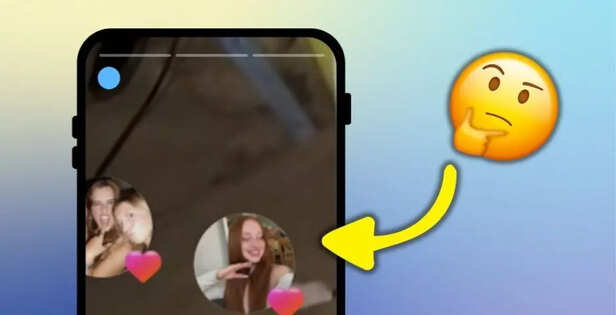
Image credit : The Tab | Turning it off keeps your activity private and your mysterious aura intact.
The step-by-step escape plan
Open Instagram
Go to Settings
Scroll down and tap Content Preferences
Turn on Hide all activity bubbles in feed and reels
Once that toggle is on, the floating heads vanish from both your main feed and Reels.
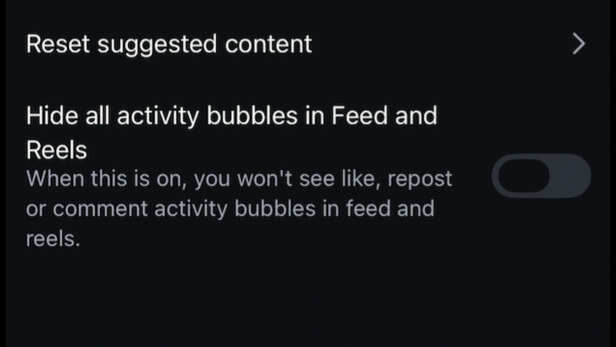
Image credit : The Tab | Yes, those activity bubbles. The tiny faces showing who liked, shared, or interacted with a post. Cute in theory, chaotic in practice.
Peace is restored.
If you are not ready for commitment, maybe you are not ready for a full break-up with the bubbles. Fair enough.
Instagram also has temporary fixes for people who want silence only sometimes. You can swipe down on the bubbles to hide them in the moment. You can also pinch outward on your screen to remove overlays while browsing.
It is giving casual boundaries.
While you are there, fix this too
If that feels deeply unnecessary, try this:
Go to settings and activity
Scroll to activity in friends tab
Choose whether likes and comments on Reels are visible to mutual followers
Turning it off keeps your activity private and your mysterious aura intact.
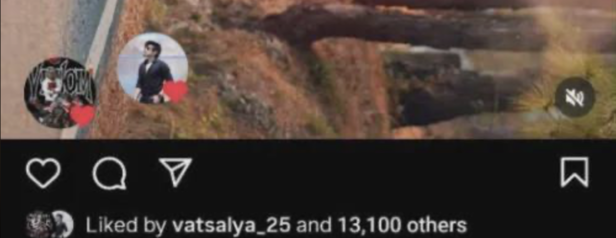
Image credit : The Tab | Choose whether likes and comments on Reels are visible to mutual followers.
Your feed, your rules
Because sometimes self-care is not a face mask or journalling.
Sometimes it is deleting floating heads from your feed.

Elon Musk backs ‘free money’ as AI threatens jobs
By Nancy Jaiswal

Trump hints at Pakistan visit if Iran deal is signed
By Nancy Jaiswal

Elon Musk confirms more Tesla Diners expansion plan
By Nancy Jaiswal

The viral Savory Girl snack plate trend explained
By Saloni Jha

How Gen Z’s love language became a new vocabulary of flirting
By Saloni Jha

Who is Tesfaye Cooper? Facebook Live torture convict back in custody after brutal Chicago cyclist assault and robbery case
By Nillohit Bagchi

Virat Kohli's 'like' on influencer LizLaz's photo sparks reactions
By Karen Noronha


